• Open Resourses
    • Quarky Series
    • evive Series
  • Courses
  • Projects
    • Projects by STEMpedia
    • Community Projects
    • Examples by STEMpedia
  • Gallery
  • Shop
  • Login
  • Getting Started
  • Free Course
  • ML Environment
  • PictoBlox Extensions
  • Arduino with PictoBlox
    Sign in Sign up
    • Open Resourses
      • Quarky Series
      • evive Series
    • Courses
    • Projects
      • Projects by STEMpedia
      • Community Projects
      • Examples by STEMpedia
    • Gallery
    • Shop
    • Login
    • Getting Started
    • Free Course
    • ML Environment
    • PictoBlox Extensions
    • Arduino with PictoBlox
    Teacher Resources ,

    Class 1 & 2 Coding Course – Teacher Resources

    View Course details

    Course Content

    Looks

    Session 1: Introduction to PictoBlox
    Session 2: Fun with paint
    Session 3: Make me Move
    Session 4: Spin around the sprite
    Session 5: Make me fly
    Session 6: Explore the direction with goto
    Session 7: Explore the direction with glide
    Session 8: Jumping sprite
    Session 9: Trace the path
    Session 10: Catch me!
    Session 11: My garden
    Motion
    Session 12: Introduction to Looks
    Session 13: Talk with me
    Session 14: Play with the size
    Session 15: Make me Tall
    Session 16: Graphical effects – 1
    Session 17: Graphical effects – 2
    Session 18: Create my Shadow
    Sounds
    Session 19: Make me Dance
    Session 20: Click me to Play
    1 of 2
    Preview thisCourse
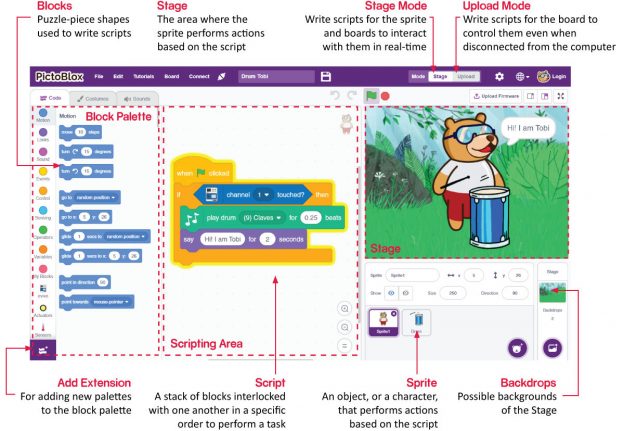
    Pictoblox UI interface scratch
    Not Enrolled
    This course is currently closed

    Course Includes

    • 30 Lessons
    Login
    Accessing this course requires a login. Please enter your credentials below!

    Lost Your Password?
    Register
    Don't have an account? Register one!
    Register an Account

    Company

    • About Us
    • Blog
    • Partners and Distributors
    • Terms and Conditions
    • Privacy Policy
    • Careers

    Community

    • Codeavour - AI Competition
    • Community Projects
    • Projects by STEMpedia
    • Example Projects
    • Python Teacher Training
    • Junior Blocks Teacher Training
    • 3D and XR Studio Teacher Training - Fundamental Level
    • 3D and XR Studio Teacher Training - Intermediate Level

    Products

    • Quarky - AI & Robotics Kit
    • Quarky Addon Kits
    • evive - STEM Kit
    • PictoBlox Software
    • Dabble App

    School Programs

    • AI & Robotics Lab
    • Atal Tinkering Labs
    • STEM Innovation Lab
    • CBSE Aligned Coding & AI Lab
    • ICSE Aligned Robotics & AI Lab

    Impact Programs

    • CSR & Government Impact Program

    Learning Resources

    • Education Center
    • Courses & Teacher Resources

    Product Documentation

    • Quarky Kits
    • evive Kits
    • PictoBlox Software
    • PictoBlox Extensions & Libraries
    • Dabble App
    • Arduino with PictoBlox

    Get in Touch

    • Contact Us
    • Book a Demo
    • Request a Quote

    Follow Us

    Facebook Twitter Youtube Instagram Linkedin

    PictoBlox - Block & Python Coding for Kids

    Dabble App - One App. Infinite Control.

    Copyright 2025 – Agilo Research Pvt. Ltd. All rights reserved – Terms & Condition | Privacy Policy